Setting Up SMTP IMAP Proxy Service
Notice
If you are using resend, you can directly use resend's SMTP service without needing this service
Why Do You Need SMTP IMAP Proxy Service
SMTP and IMAP have a wider range of application scenarios
How to Set Up SMTP IMAP Proxy Service
Local Run
cd smtp_proxy_server/
# Copy configuration file and modify it
# Your worker address, proxy_url=https://temp-email-api.xxx.xxx
# Your SMTP service port, port=8025
cp .env.example .env
python3 -m venv venv
./venv/bin/python3 -m pip install -r requirements.txt
./venv/bin/python3 main.py
Docker Run
cd smtp_proxy_server/
docker-compose up -d
Modify the environment variables in docker-compose.yaml, note to choose the appropriate tag
proxy_url is the URL address of the worker
services:
  smtp_proxy_server:
    image: ghcr.io/dreamhunter2333/cloudflare_temp_email/smtp_proxy_server:latest
    # build:
    #   context: .
    #   dockerfile: dockerfile
    container_name: "smtp_proxy_server"
    ports:
      - "8025:8025"
      - "11143:11143"
    environment:
      - proxy_url=https://temp-email-api.xxx.xxx
      - port=8025
      - imap_port=11143
Environment Variables
| Variable | Default | Description |
|---|---|---|
proxy_url | http://localhost:8787 | Worker backend URL |
port | 8025 | SMTP port |
imap_port | 11143 | IMAP port |
smtp_tls_cert | empty | SMTP TLS certificate file path (PEM), enables STARTTLS when configured |
smtp_tls_key | empty | SMTP TLS private key file path (PEM) |
imap_tls_cert | empty | IMAP TLS certificate file path (PEM), enables STARTTLS when configured |
imap_tls_key | empty | IMAP TLS private key file path (PEM) |
imap_cache_size | 500 | Max cached messages per mailbox |
imap_http_timeout | 30.0 | Backend HTTP request timeout (seconds) |
imap_flag_db_path | data/imap_flags.db | SQLite file storing IMAP flags (e.g. \Seen) so STORE (mark as read) survives client reconnects. Mount a volume over its parent directory so it persists across container restarts |
Enabling STARTTLS
Configure the TLS certificate environment variables for SMTP and/or IMAP to enable STARTTLS support. SMTP and IMAP can share the same certificate.
# .env example
smtp_tls_cert=/path/to/cert.pem
smtp_tls_key=/path/to/key.pem
imap_tls_cert=/path/to/cert.pem
imap_tls_key=/path/to/key.pem
In Docker Compose:
environment:
  - smtp_tls_cert=/certs/cert.pem
  - smtp_tls_key=/certs/key.pem
  - imap_tls_cert=/certs/cert.pem
  - imap_tls_key=/certs/key.pem
volumes:
  - ./certs:/certs:ro
IMAP Login Methods
Two login methods are supported:
| Method | Username | Password | Description |
|---|---|---|---|
| JWT Credential | Email address | JWT token | Address credential from frontend, direct authentication |
| Address+Password | Email address | Address password | Verified via backend /api/address_login |
The system automatically detects the password format: a three-segment string starting with eyJ is treated as a JWT; otherwise it is treated as a password and verified via the backend.
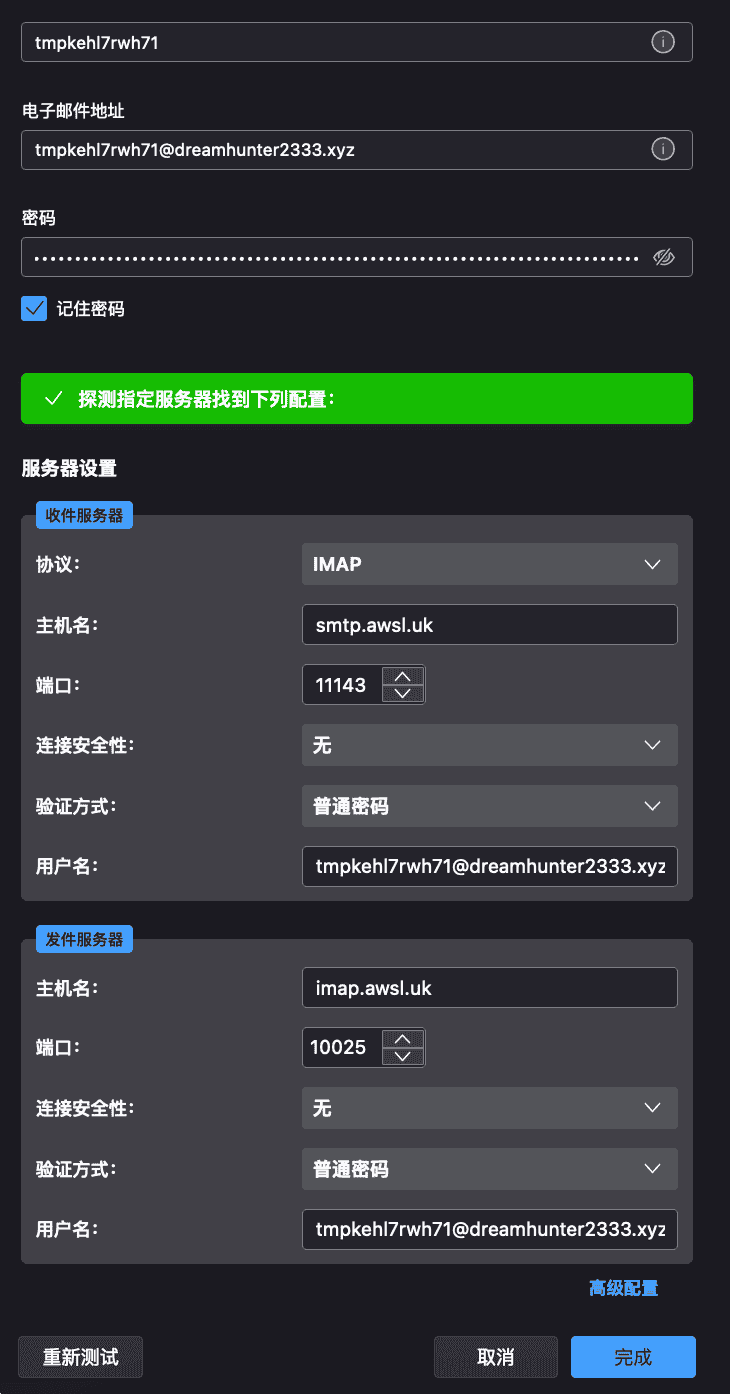
Using Thunderbird to Login
Download Thunderbird
For password, enter the email address credential or email address password